Accurate analysis of categorical data is central to clinical research, epidemiology, pharmacology, and many areas of biological science. When researchers need to know whether two categorical variables are associated—such as treatment vs. recovery or exposure vs. disease—the two most commonly used tests are the Chi-Square Test and Fisher’s Exact Test.
This guide explains the theory, shows examples, and provides step-by-step instructions for running each test in BioStat Prime . It also covers interpretation, visualization, and FAQs to make your analysis practical and reproducible.
What Is Categorical Data?
Categorical data are variables that take values in discrete groups rather than on a numeric continuum. Examples include:
- Treatment: Drug / Placebo
- Outcome: Recovered / Not Recovered
- Reaction: Present / Absent
When testing for association between two categorical variables, the go-to tests are Chi-Square (best for larger samples) and Fisher’s Exact (best for small samples or low expected counts).
Chi-Square Test (χ² Test): Concept and Example
The Chi-Square Test of Independence compares observed counts in each cell of a contingency table with expected counts that would occur if the two variables were independent. Large differences produce a large χ² value and a small p-value, indicating association.
Formula
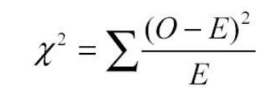
O = observed count; E = expected count.
Example: Diet and Recovery After Surgery
A surgeon studies 80 patients to test if diet affects recovery speed.
| Diet Type | Recovered | Not Recovered | Total |
|---|---|---|---|
| Vegetarian | 28 | 12 | 40 |
| Non-Vegetarian | 35 | 5 | 40 |
| Total | 63 | 17 | 80 |
Use the Chi-Square Test if expected counts ≥ 5 in each cell. If χ² produces p < 0.05, conclude that diet and recovery are likely associated.
Performing Chi-Square Test in BioStat Prime (Step-by-Step)
BioStat Prime provides a distribution plot and an easy dialog to run the test.
- Load the dataset — import from Excel, CSV or clipboard.
- Click the "Distribution" tab in the main menu.
- Select "Chi-Square Test" — the Chi-Square Distribution analysis dialog opens.
- Set options in the dialog (variables, degrees of freedom, significance level, tail selection if applicable).
- Execute the analysis.
- View the Output Window, which shows:
- Chi-Square statistic (χ²)
- Degrees of freedom (df)
- p-value and textual interpretation
- Chi-Square Distribution plot for visual reference
The distribution plot helps you visualize where your test statistic lies relative to the expected χ² distribution, complementing the numeric output for reports and presentations.
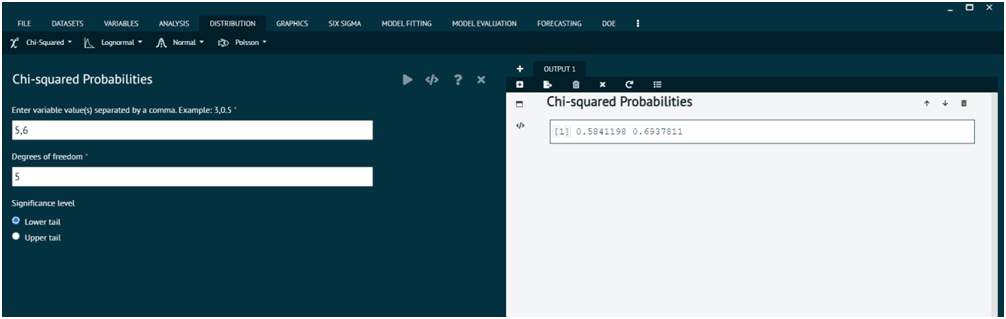
Chi-Square Test dialog and output in BioStat Prime
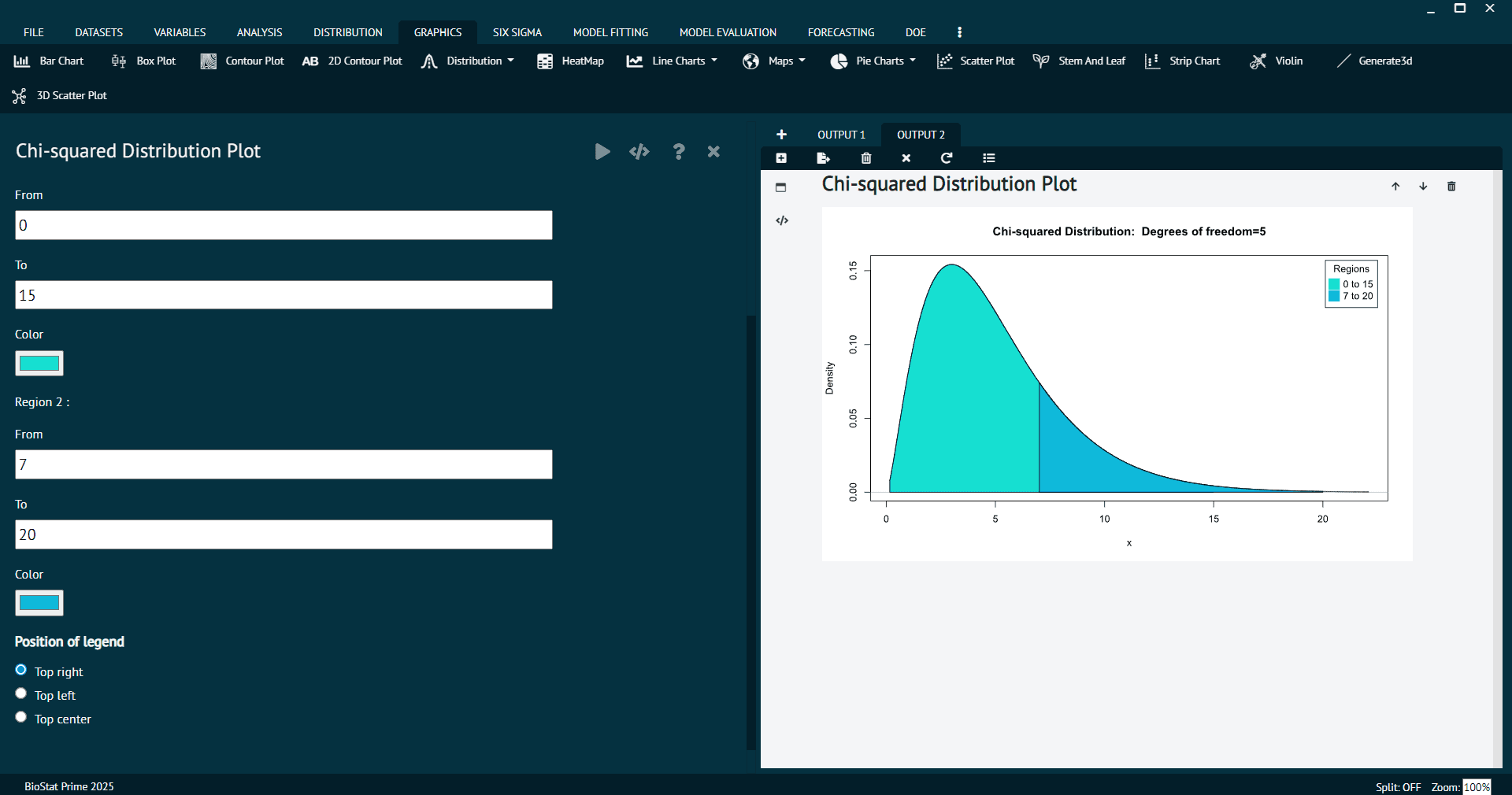
Chi-Square Distribution Plot with visual representation
Fisher’s Exact Test – Concept and Example
Fisher’s Exact Test computes the exact probability of observing your contingency table under the null hypothesis of independence. It’s preferred when sample sizes are small or expected frequencies < 5.
Example: Pilot Drug Safety Study
A 20-participant pilot checks whether a new drug causes mild reactions.
| Group | Reaction | No Reaction | Total |
|---|---|---|---|
| Drug | 3 | 7 | 10 |
| Placebo | 0 | 10 | 10 |
| Total | 3 | 17 | 20 |
Because of the small counts (and zeros), Fisher's Exact Test gives a valid p-value where χ² would be unreliable.
Performing Fisher's Exact Test in BioStat Prime (Step-by-Step)
Below is the exact, adjusted workflow you provided — integrated into the blog for clarity and consistency.
- Load the dataset
Open the dataset in BioStat Prime. - Select the Test
Navigate to Analysis → Crosstab → Odds Ratio / Relative Risks. - Choose Variables
Select the two categorical variables (for example, Drug Type and Side Effects). - Select Fisher Test and Click Run Analysis
In the Crosstab dialog, choose Fisher's Exact Test and click Run Analysis to compute the exact p-value. - Review Output
The output includes:- Exact p-value (the probability under the null)
- Interpretation (Significant / Not Significant)
- Contingency Table — frequency of predictor (adjacent counts): a clear cross-tab showing the count of predictor categories adjacent to outcome counts so the user can see how many observations fall in each predictor/outcome pair
Note: "Frequency of predictor (adjacent counts)" means the contingency table displays predictor categories alongside outcome counts in adjacent cells, making it easier to interpret raw frequencies and calculate odds ratios or relative risks.
This workflow allows BioStat Prime users to compute exact p-values, inspect raw counts, and export the results for reports or publications.
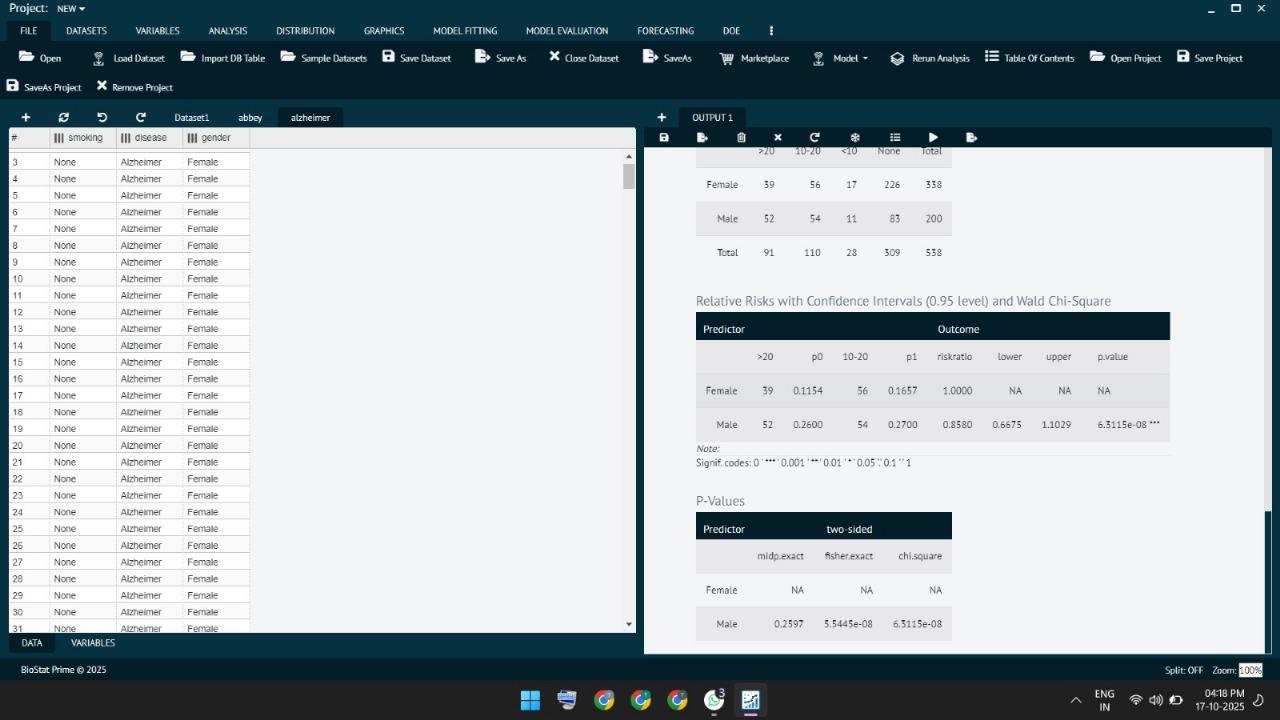
Fisher's Exact Test output with contingency table and p value

Odds Ratios/Relative Risks analysis dialog for Fisher's Exact Test
Interpreting BioStat Prime Output
After running either test, BioStat Prime supplies:
- Observed and expected counts (for χ²)
- χ² statistic and degrees of freedom
- Exact p-value (for Fisher's)
- Textual interpretation (auto-generated summary)
- Visuals: Chi-Square Distribution plot, mosaic plots, bar charts
How to interpret p-values:
- p < 0.05: reject the null hypothesis — evidence of association.
- p ≥ 0.05: insufficient evidence — variables appear independent.
Always complement significance testing with effect size (odds ratio, risk ratio) and real-world context.
Why Use BioStat Prime For Categorical Analysis?
BioStat Prime makes statistical testing easy and clear. It is designed for students, teachers, and researchers who want results fast without writing code.
- Clear contingency tables with adjacent frequency counts for quick inspection
- Distribution plots for visual confirmation of χ² behavior
- Exportable, publication-ready outputs (tables, charts, and text summaries)
- No coding required — perfect for researchers, clinicians, and students
BioStat Prime helps you focus on your research question instead of complex calculations.
Common Ways Researchers Use These Tests
Both Chi-Square Test and Fisher's Exact Test are useful in many areas of biostatistics and public health.
| Field | Example Use |
|---|---|
| Clinical Trials | Check if two treatments have different recovery rates. |
| Safety Studies | Find if a new drug causes mild or rare side effects. |
| Epidemiology | Study if a disease is related to a specific exposure. |
| Genetics | Test if a gene type is linked to a visible trait. |
| Public Health | See if vaccination status affects infection rates. |
Researchers use these tests because they are simple, powerful, and widely accepted in medical and life science studies.
Fisher's Exact Test vs Chi-Square – Key Differences
| Feature | Chi-Square Test | Fisher’s Exact Test |
|---|---|---|
| Sample Size | Large datasets | Small datasets |
| Expected Frequency | ≥ 5 per cell | < 5 per cell |
| Calculation Method | Approximation | Exact probability |
| Table Size | Any (e.g., 3×3) | Best for 2×2 |
| Computation Speed | Faster | Slower for large data |
| Result Type | χ² statistic + p-value | Exact p-value only |
Note: Use Chi-Square Test for large datasets, and Fisher's Exact Test when data is small or has low counts.
Similarities Between Chi-Square and Fisher's Exact Test
| Aspect | Chi-Square Test | Fisher's Exact Test | Similarity |
|---|---|---|---|
| Purpose | Tests association or independence between two categorical variables using an approximate method. | Tests association or independence between two categorical variables using an exact probability method. | Both evaluate relationships or independence between categorical variables. |
| Data Type | Suitable for categorical (nominal) data, typically arranged in 2×2 or larger contingency tables. | Also used for categorical data, primarily in 2×2 contingency tables. | Both analyze frequency-based categorical data. |
| Hypotheses | H₀: No association between variables. H₁: Association exists. | H₀: No association between variables. H₁: Association exists. | Both use the same null and alternative hypotheses. |
| Statistical Output | Provides Chi-square statistics (χ²), degrees of freedom, and p-value. | Provides exact p-value without approximation. | Both rely on p-values for statistical decision-making. |
| Interpretation Criteria | p < 0.05 indicates significant association; p > 0.05 indicates no association. | p < 0.05 indicates significant association; p > 0.05 indicates no association. | Both interpret results using the same significance level (α = 0.05). |
| Usage in BioStat Prime | Available under Distribution → Chi-Square Test with visual Chi-Square Distribution plot. | Accessible via Analysis → Crosstab → Odds Ratio/Relative Risks → Fisher's Test. | Both tests can be performed easily within BioStat Prime's intuitive interface. |
| Research Applications | Commonly used in biostatistics, public health, and categorical data analysis. | Preferred for small sample sizes and categorical data in biomedical research. | Both are applied in biostatistics and public health research. |
Both Chi-Square and Fisher's Exact tests help assess the association or independence between categories — the main goal of categorical data analysis.
Before You Start: Quick Checklist for Categorical Tests
- Verify data are counts (not percentages).
- Confirm observations are independent.
- For Chi-Square: check that expected counts ≥ 5 where possible.
- For small samples or low expected counts, use Fisher’s Exact Test.
- Report both p-values and effect sizes (odds ratio or risk ratio).
This checklist helps you minimize errors and ensure your results are accurate, clear, and easy to interpret.
FAQ
Use the Chi-Square Test to check if two categorical variables are associated. It is suitable when: Both variables are nominal or ordinal, Sample size is large (expected frequency ≥ 5 per cell), and Observations are independent. Example: Testing if recovery rates differ between treatment groups.
The Chi-Square Test is used to determine whether there is a significant association between two categorical variables. It helps researchers: Test if variables are independent or related, Analyze frequency data in contingency tables, and Make decisions in clinical trials, surveys, and research studies.
If any expected cell frequency is less than 5 or total sample size is small, prefer Fisher's Exact Test.
Fisher's Exact Test is used to determine whether there is a significant association between two categorical variables, especially when: Sample size is small, Expected cell counts are low (<5), and Data are organized in a 2×2 contingency table. It calculates the exact probability of observing the data under the null hypothesis, providing a reliable p-value where Chi-Square may be inaccurate.
Yes. When you use Analysis → Crosstab → Odds Ratio / Relative Risks, BioStat Prime calculates these measures along with Fisher's Exact Test.
It refers to the contingency table layout where predictor categories are displayed adjacent to outcome counts, making interpretation and effect-size calculation straightforward.
The choice between Chi-Square and Fisher's Exact Test depends on sample size and expected frequencies: Chi-Square Test is best for large datasets with expected cell counts ≥ 5 and provides an approximate p-value. Fisher's Exact Test is preferred for small datasets or low expected counts (<5), provides an exact p-value, and is ideal for 2×2 contingency tables.
Chi-Square can be applied to tables of any size, while Fisher's Exact Test is ideal for 2×2 tables, particularly when dealing with small sample sizes.
It helps find if two factors (like treatment and recovery) are related. It's used in medical, biological, and social research.
Conclusion
BioStat Prime is a powerful and user-friendly platform for performing advanced categorical data analysis, including both the Chi-Square Test and Fisher's Exact Test. Its intuitive interface, and clear, publication-ready outputs make it ideal for researchers, clinicians, and students alike.
With BioStat Prime, users can effortlessly:
- Perform Chi-Square and Fisher's Exact Tests with step-by-step guidance
- Access visual distribution plots and clear contingency tables, including frequency of predictor (adjacent counts)
- Interpret results quickly with auto-generated summaries
- Export tables, charts, and statistical outputs for reports or publications
Whether your data is large or small, BioStat Prime ensures your analysis is accurate, simple, and ready to use.
It turns complex biostatistics into clear, reliable insights — perfect for students, teachers, and professionals.
It bridges the gap between complex statistical methods and practical usability, empowering users to focus on meaningful insights rather than manual calculations.